LM 格式强制器#
LM 格式强制器是一个能够强制语言模型输出符合指定格式(JSON Schema、正则表达式等)的库。与仅向大语言模型"建议"期望输出结构不同,LM 格式强制器可以实际"强制"LLM输出遵循预定模式。
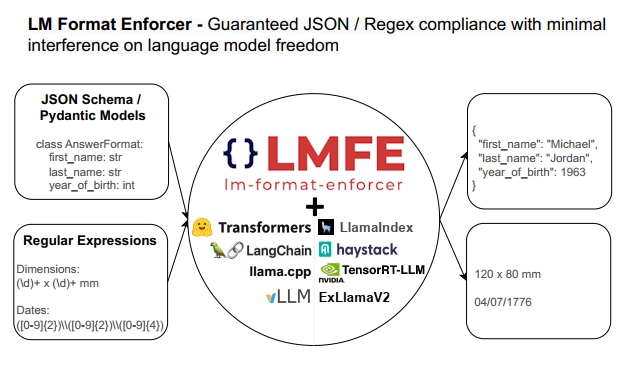
LM 格式强制器支持本地LLM(目前兼容LlamaCPP和HuggingfaceLLM后端),仅通过处理LLM的输出逻辑(logits)实现运作。这使得它能够支持波束搜索(beam search)和批处理等高级生成方法,而其他需要修改生成循环本身的解决方案则无法实现。详见LM 格式强制器页面中的对比表格。
JSON Schema 输出#
在LlamaIndex中,我们提供了与LM 格式强制器的初步集成,使生成结构化输出(特别是pydantic对象)变得极其简单。
例如,要生成包含以下结构的歌曲专辑:
class Song(BaseModel):
    title: str
    length_seconds: int


class Album(BaseModel):
    name: str
    artist: str
    songs: List[Song]
只需创建LMFormatEnforcerPydanticProgram,指定目标pydantic类Album,并提供合适的提示模板即可。
注意:
LMFormatEnforcerPydanticProgram会自动将pydantic类的json schema填充到提示模板的可选参数{json_schema}中。这能帮助LLM自然地生成正确JSON,减少格式强制器的干扰强度,从而提高输出质量。
program = LMFormatEnforcerPydanticProgram(
    output_cls=Album,
    prompt_template_str="Generate an example album, with an artist and a list of songs. Using the movie {movie_name} as inspiration. You must answer according to the following schema: \n{json_schema}\n",
    llm=LlamaCPP(),
    verbose=True,
)
现在可以通过传入额外用户输入来运行程序。这里我们选择恐怖题材,以《闪灵》为灵感创建专辑。
output = program(movie_name="The Shining")
得到pydantic对象:
Album(
    name="The Shining: A Musical Journey Through the Haunted Halls of the Overlook Hotel",
    artist="The Shining Choir",
    songs=[
        Song(title="Redrum", length_seconds=300),
        Song(
            title="All Work and No Play Makes Jack a Dull Boy",
            length_seconds=240,
        ),
        Song(title="Heeeeere's Johnny!", length_seconds=180),
    ],
)
可通过此笔记本查看更多细节。
正则表达式输出#
LM 格式强制器也支持正则表达式输出。由于LlamaIndex中尚未内置正则表达式抽象,我们将直接在LLM中使用,并注入LM格式生成器。
regex = r'"Hello, my name is (?P<name>[a-zA-Z]*)\. I was born in (?P<hometown>[a-zA-Z]*). Nice to meet you!"'
prompt = "Here is a way to present myself, if my name was John and I born in Boston: "

llm = LlamaCPP()
regex_parser = lmformatenforcer.RegexParser(regex)
lm_format_enforcer_fn = build_lm_format_enforcer_function(llm, regex_parser)
with activate_lm_format_enforcer(llm, lm_format_enforcer_fn):
    output = llm.complete(prompt)
这将使LLM按照我们指定的正则表达式格式生成输出。我们还可以解析输出来获取命名组:
print(output)
# "Hello, my name is John. I was born in Boston, Nice to meet you!"
print(re.match(regex, output.text).groupdict())
# {'name': 'John', 'hometown': 'Boston'}
详见此笔记本。