
基于 VideoDB 的多模态 RAG 实现
RAG:视频的多模态搜索与流媒体播放结果 📺
构建针对文本的 RAG(检索增强生成)流程相对简单,这得益于现有的文本解析、索引和检索工具。
然而,将 RAG 模型适配于视频内容则面临更大挑战。视频融合了视觉、听觉和文本元素,需要更强的处理能力和复杂的视频处理流程。
VideoDB 是一款无服务器数据库,专为简化视频内容的存储、搜索、编辑和流媒体传输而设计。通过构建索引并开发查询浏览视频内容的接口,VideoDB 实现了对时序视频数据的随机访问。了解更多请访问 docs.videodb.io。
要构建真正的视频多模态搜索系统,您需要处理视频的不同模态特征,例如语音内容和视觉元素。
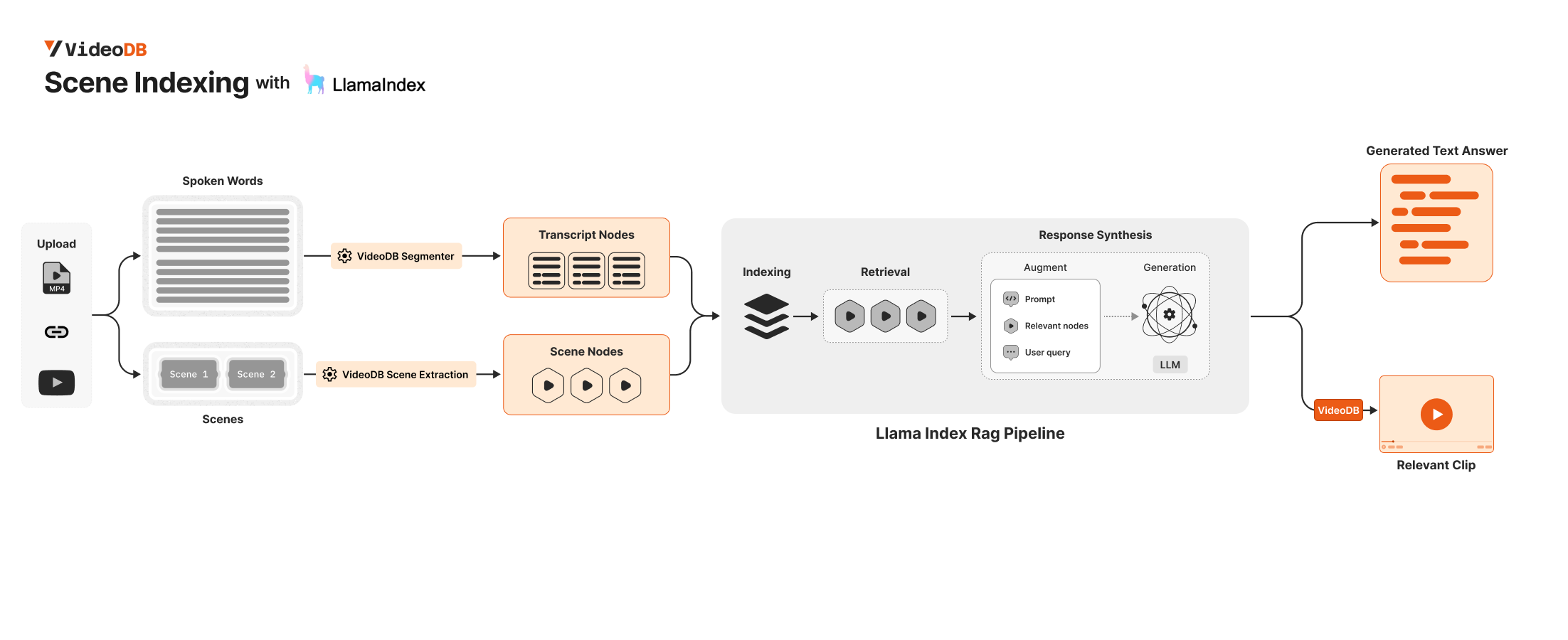
本指南将展示如何使用 VideoDB 和 Llama-Index 开发视频多模态 RAG 系统 ✨。
🔑 环境要求
连接 VideoDB 只需获取 API 密钥并建立连接。您可以通过设置 VIDEO_DB_API_KEY 环境变量实现。该密钥可从 👉🏼 VideoDB 控制台 获取(前 50 次上传免费,无需绑定信用卡!)。
为使用 llama_index 响应合成器,请从 OpenAI 平台获取您的 OPENAI_API_KEY。
import os

os.environ["VIDEO_DB_API_KEY"] = ""
os.environ["OPENAI_API_KEY"] = ""
%pip install videodb
%pip install llama-index
🛠 构建多模态 RAG
from videodb import connect

# connect to VideoDB
conn = connect()
coll = conn.get_collection()

# upload videos to default collection in VideoDB
print("Uploading Video")
video = conn.upload(url="https://www.youtube.com/watch?v=libKVRa01L8")
print(f"Video uploaded with ID: {video.id}")


# video = coll.get_video("m-56f55058-62b6-49c4-bbdc-43c0badf4c0b")
Uploading Video
Video uploaded with ID: m-0ccadfc8-bc8c-4183-b83a-543946460e2a
coll = conn.get_collection(): 返回默认集合对象。coll.get_videos(): 返回集合中所有视频的列表。coll.get_video(video_id): 根据给定的video_id返回视频对象。
📸🗣️ 第二步:从视频中提取场景片段
首先,我们需要从视频中提取场景,然后使用 vLLM 获取每个场景的描述。
要了解更多关于场景提取的选项,请查阅以下指南:
- 场景提取选项指南 深入探讨了场景索引中可用的各种场景提取选项。该指南涵盖高级设置、自定义功能,以及根据不同需求和偏好优化场景提取的技巧。
from videodb import SceneExtractionType


# Specify Scene Extraction algorithm
index_id = video.index_scenes(
    extraction_type=SceneExtractionType.time_based,
    extraction_config={"time": 2, "select_frames": ["first", "last"]},
    prompt="Describe the scene in detail",
)
video.get_scene_index(index_id)

print(f"Scene Extraction successful with ID: {index_id}")
Indexing Visual content in Video...
Scene Index successful with ID: f3eef7aee2a0ff58
✨ 第三步:将 VideoDB 集成至现有 Llamaindex RAG 流程
要开发一个全面的视频多模态搜索系统,需要处理视频的不同模态,包括语音内容和视觉元素。
您可以使用 VideoDB 检索视频的所有文本节点(Transcript Nodes)和视觉节点(Visual Nodes),然后将它们整合到 LlamaIndex 流程中。
🗣 获取转录节点
你可以通过 Video.get_transcript() 获取转录文本节点
配置分段器时,请使用 segmenter 和 length 参数
分段器的可选值为:
Segmenter.time:根据指定的秒数length对视频进行分段Segmenter.word:根据length指定的单词数量对视频进行分段
from videodb import Segmenter
from llama_index.core.schema import TextNode


# Fetch all Transcript Nodes
nodes_transcript_raw = video.get_transcript(
    segmenter=Segmenter.time, length=60
)

# Convert the raw transcript nodes to TextNode objects
nodes_transcript = [
    TextNode(
        text=node["text"],
        metadata={key: value for key, value in node.items() if key != "text"},
    )
    for node in nodes_transcript_raw
]
📸 获取场景节点
# Fetch all Scenes
scenes = video.get_scene_index(index_id)

# Convert the scenes to TextNode objects
nodes_scenes = [
    TextNode(
        text=node["description"],
        metadata={
            key: value for key, value in node.items() if key != "description"
        },
    )
    for node in scenes
]
🔄 基于转录文本与场景节点的简易 RAG 流程
我们对 Transcript Nodes(转录节点)和 Scene Node(场景节点)都建立了索引
🔍✨ 为简化流程,我们采用了基础的 RAG 流水线。但您可在此集成更先进的 LlamaIndex RAG 流水线以获得更佳效果。
from llama_index.core import VectorStoreIndex

# Index both Transcript and Scene Nodes
index = VectorStoreIndex(nodes_scenes + nodes_transcript)
q = index.as_query_engine()
The narrator discusses the location of our Solar System within the Milky Way galaxy, emphasizing its position in one of the minor spiral arms known as the Orion Spur. The images provided offer visual representations of the Milky Way's structure, with labels indicating the specific location of the Solar System within the galaxy.
️💬️ 查看结果:文本
res = q.query(
    "Show me where the narrator discusses the formation of the solar system and visualize the milky way galaxy"
)
print(res)
🎥 查看结果:视频片段
我们的节点元数据包含 start 和 end 字段,这些字段表示相对于视频开始时间的起始和结束时间。
利用相关节点的这些信息,我们可以创建与这些节点对应的视频片段。
from videodb import play_stream


# Helper function to merge overlapping intervals
def merge_intervals(intervals):
    if not intervals:
        return []
    intervals.sort(key=lambda x: x[0])
    merged = [intervals[0]]
    for interval in intervals[1:]:
        if interval[0] <= merged[-1][1]:
            merged[-1][1] = max(merged[-1][1], interval[1])
        else:
            merged.append(interval)
    return merged


# Extract relevant timestamps from the source nodes
relevant_timestamps = [
    [node.metadata["start"], node.metadata["end"]] for node in res.source_nodes
]

# Create a compilation of all relevant timestamps
stream_url = video.generate_stream(merge_intervals(relevant_timestamps))
play_stream(stream_url)